ALERTON COMPASS
A Legacy in Friction
I worked on a high-stakes project for Alerton, a Honeywell brand with a 40-year legacy. We were looking at their flagship product, Compass, which is used in over 15,000 sites globally. Despite its success, it had a 'skeletons in the closet' problem: the installation process was a nightmare for our 120+ dealers.
15K
Installed Sites
120+
120+
Dealers & Partners
40+
Years of Experience
~$55M
Revenue (2024)
Project Overview
The updated installation and upgrade experience offers a streamlined process aimed at greatly simplifying the deployment of the Compass application and its related tools. This approach is designed to save time and reduce complexity making it easier for users to get started.
Problem Statement
During dealer meetings, we identified ongoing issues related to installation practices. These challenges indicate potential absence of standardized protocols or support materials, which could adversely affect user experience and satisfaction.
Project Goals


User problems
-
Installation takes 4-6 hours, causing delays on-site.
-
Too many manual steps (~100 clicks) leading to frequent errors.
-
Missing prerequisites and misconfigured Windows settings cause installation failures.
-
Need to uninstall previous versions before upgrading.
-
Windows updates disrupt both installation and upgrades.
-
Large ISO size (~3.5 GB) makes downloads slow.
-
Outdated UI and confusing IA mix installation and configuration steps.
-
No centralized place to view or manage tools.
-
Lack of timely notifications for updates or issues.
Personas


Understanding the Problem
Before redesigning, we analyzed TAC reports, dealer feedback, and the existing workflow to understand why installations were slow and error‑prone.
The core issues became clear: too many manual steps, dependency failures, mixed installation‑configuration flows, and an outdated UI. These insights highlighted the need for a simpler, guided, and more reliable installation experience.

Possible Solutions
Based on the all the information collected through research and findings, I figured that an application will require following functionality to promote a healthy lifestyle
Reduces download time, supports low‑bandwidth environments, and replaces the bulky 3.5 GB ISO.
Add Automated Prerequisite & System Checks
Create a Simplified, Non‑Disruptive Upgrade Path
A unified place to install, upgrade, repair, or uninstall Compass and associated tools, eliminating the need to navigate multiple locations.
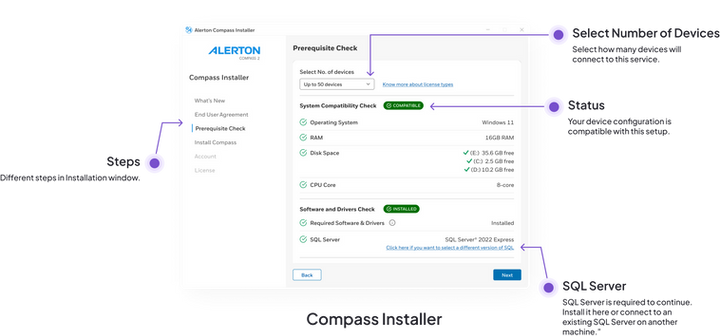
Reduces cognitive load with guided steps, removing nearly 100 manual interactions from the current process.
Decouple Installation and Configuration Processes
Modernize the UI with Accessibility‑Focused Design
Primary Research
To deeply understand the challenges faced by site engineers during installation, we conducted Q/A sessions, dealership VOCs, and multiple calls with users arranged by the Offering Manager.
During this research phase, I focused on understanding:
-
How site engineers currently perform installation and upgrades at customer sites
-
The common points where installation fails or gets delayed
-
Impact of Windows updates, missing prerequisites, and misconfigurations
-
How much time and effort the current process demands (4–6 hours)
-
What creates hesitation or fear around upgrading existing deployments
Secondary Research
To identify the best possible solution direction, I reviewed industry practices for enterprise software deployment, upgrade workflows, and Windows‑based installer patterns
From this analysis, I identified key principles that guided the redesign:
-
Automate prerequisites to reduce dependency errors
-
Minimize manual steps (<30 clicks) to reduce cognitive load and mistakes
-
Decouple installation and configuration to avoid workflow confusion
-
Enable seamless upgrades without uninstalling prior versions
-
Provide centralized visibility through an integrated Solution Center
-
Introduce resilient mechanisms to avoid disruption from system updates

Wireframes


Information Architecture
To get innovative solutions into the hands of your users, I needed to concentrate on idea generation. Based on my understanding of the problem, I brainstormed the Information architecture and user flow to ensure smooth experience for the users.

User Flow


Light Mode Visual Designs

Dark Mode Visual Designs